Virtual makeup game free
Makeup Rush 3D is a virtual makeup game you can play free: open makeupgame3d.com, pick Maya or Lina, then paint the WebGL face in your browser — no camera, no install, no account, and no payment to start painting.
.
Virtual here means a 3D character, not your selfie
A lot of “virtual makeup” results are camera try-ons: the app asks for the webcam, maps lipstick onto your live face, then sells a product. Makeup Rush 3D is the other kind. You paint a bundled virtual head — Maya or Lina — with a brush rail. There is no selfie overlay and no camera permission. Home waits until you press Play Free; the WebGL mesh loads in the tab after that click.
That is why this page can say free virtual makeup game online without a store listing: a modern browser with WebGL is the whole runtime. You are scoring a painted look, not checking out a lipstick SKU.
| Makeup Rush 3D | Typical AR try-on | Paper-doll dress-up | |
|---|---|---|---|
| Who you paint | Maya or Lina (bundled 3D mesh) | Your live camera face | A flat doll or sticker board |
| Camera | Never asked | Required for the overlay | Usually none |
| How color lands | WebGL brush strokes on lids, cheeks, lips | A filter mapped to landmarks | Tap-to-stamp stickers |
| Cost to start | No checkout, no account | Often an app install + IAP | Varies |
| Where the look lives | Local gallery, up to 8 on this device | Often a cloud album after sign-in | Varies |
The right-hand columns are a category sketch, not a review of a named app. This site is a free virtual makeup game in the browser: you dress a virtual face with paint, then keep the picture here.
Pick the virtual face: Maya or Lina
Face choice is the first free decision. You lock it on Home before Play Free. Both faces are virtual models, not photos of a person.
- Maya and Lina share the same rail: eyeshadow, blush, lipstick, gloss, eyeliner, brow, foundation, concealer, contour, highlight, contacts, glitter, and eraser.
- Switching faces does not install a second game. It reloads the mesh you paint on.
- Modes, starters, and scoring stay the same. Only the virtual head changes.
- If you want the other face mid-look, return to Home and start again. Resume draft can bring back the previous mesh if this browser still holds it.
A look page’s play button keeps the face you already chose on Home. Compare the three starter portraits on the looks collection, then paint the one you want on Maya or Lina.
Where to paint on the virtual head
The canvas is a 3D mesh, so a stroke only hits the skin you can see. These first-hand pairings are how this studio is wired — not a generic makeup tutorial.
| Zone on Maya / Lina | Brush | View preset | Orbit? |
|---|---|---|---|
| Near lid | Eyeshadow (eyes close on this tool) | Eyes | No — front view is enough |
| Far lid and outer corner | Eyeshadow, then eyeliner | Eyes | Yes — turn the head, then paint |
| Cheeks | Blush at low opacity; Mirror starts on | Face | Only if you shade the hollow from the side |
| Mouth | Lipstick, then gloss; Mirror starts off | Lips | No — shape the mouth yourself |
| Jaw and cheek hollow | Contour | Face | Yes — the jaw hides until you rotate |
| Brow bone and nose bridge | Highlight | Face or Eyes | Rarely |
| Iris | Contacts (one stamp; a drag does not repeat) | Eyes | No |
Drag on the face to paint. That drag never orbits. Press Orbit, then drag, to turn the virtual head. Scroll or pinch to zoom; a two-finger pinch does not paint. Clip to lids & lips keeps color on the lid or mouth. Settings also holds brush size, opacity, Custom color, and Reset view.
Three free clocks on the same virtual face
Mode is only the timer. Every brush and every starter stays available in all three. Painting itself never asks for a card. This is the free virtual makeup game browser loop: same Maya or Lina, three clocks.
| Mode | Time | Coins | Virtual-face plan |
|---|---|---|---|
| Quick 90s | 90 seconds | Can award when the face is painted | Near lids, blush, lips — skip Orbit, glitter, and contacts |
| Free studio | None | Never | Learn Orbit on the far lid and jaw with no countdown |
| Classic 9 min | 9 minutes | Can award when the face is painted | A full night or princess face, including the hidden jaw |
A blank finish pays nothing. Repeating the same timed round does not pay twice. This page’s play button opens Free studio so you can learn the virtual head without a clock. Scoring (coverage, theme-palette match, tool/color variety) lives on how to play.
Three virtual looks to try first
The local gallery and the looks collection treat three original portraits as starters. Each page opens Free studio with the matching theme. The screenshot is an example painted on the virtual mesh, not a stamp you have to match.
Summer Juice
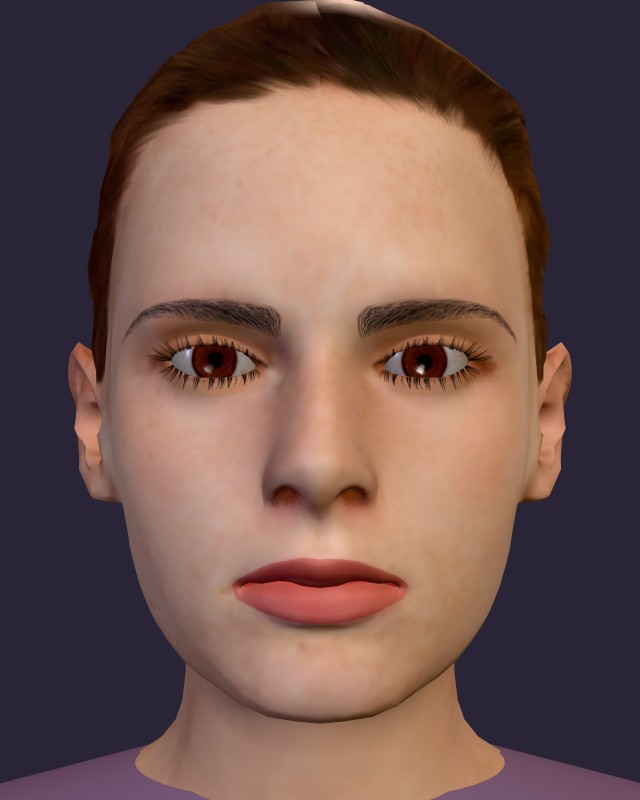
Daily starter plus the Summer Juice theme. Warm lids on Maya, then one small mint accent if you want contrast.
Gothic Night
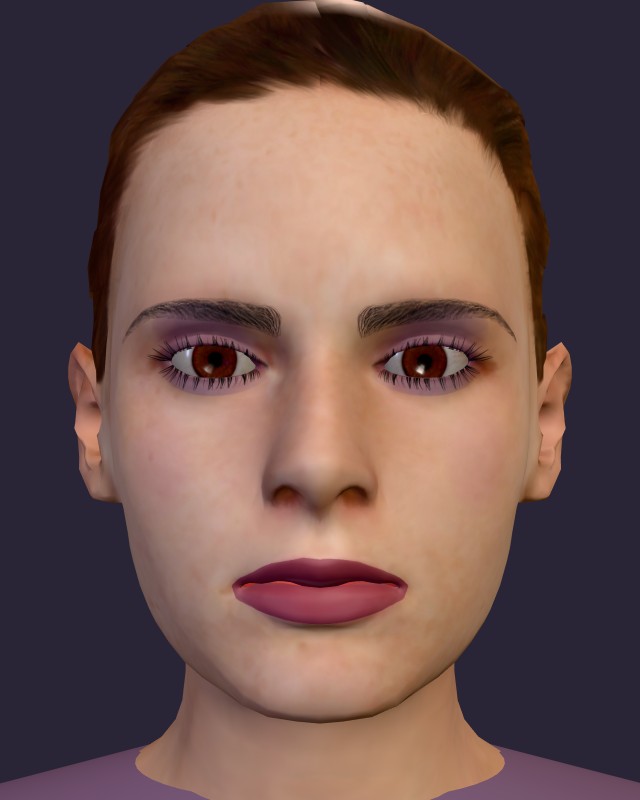
Gothic starter plus the night theme. Light lid passes on the virtual mesh beat one heavy coat.
Sweetheart
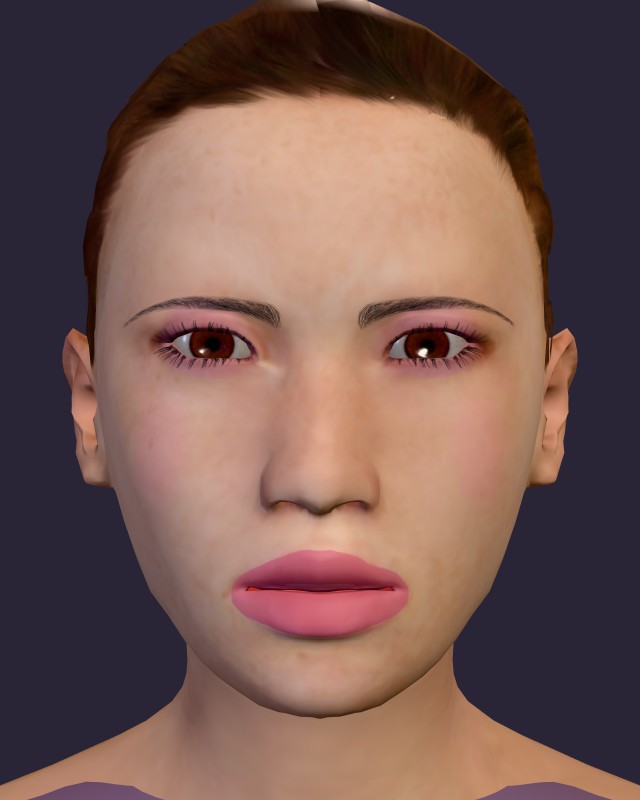
Sweet starter plus the Sweetheart theme. A useful first free virtual round: eyes, cheeks, and lips are already pink on Lina.
What stays free on a virtual session
A new browser starts with 500 coins. Coins unlock optional extras only — Neon Glow and Macaron palettes (300 each), Gilded Metal (500), and the Aurora theme (200). Daily, Sweet, and Gothic starters stay free either way. Share, Download, and Save to gallery stay on this device. There is no cloud album and no account to sync. Clearing site data for this origin empties the gallery and the draft.
That is the whole free loop: pick a virtual face, pick a mode, paint in the browser, save or download here. No installer, no webcam, no payment.
Related guides
This page is the virtual-face path: Maya or Lina in the browser, no camera, no payment to paint. For the free 3D path: 3D makeup game online free. For dress-up framing: makeup dress up game online. For the face → mode → starter session: play makeup game online. For the tab/WebGL path: free browser makeup game. For the install question: free 3D makeup game, no download.
Questions
Is Makeup Rush 3D a virtual makeup game I can play free?
Yes. You paint a virtual 3D face — Maya or Lina — in the browser. Painting never needs a checkout, an account, a camera, or an installer.
Is this a free virtual makeup game online, or do I download an app?
Online, in the browser. Open the site, press Play Free, and the WebGL head loads in the tab. There is no store package.
Does a virtual makeup game in the browser use my camera?
No. Makeup Rush 3D paints a bundled mesh. It does not ask for the webcam or map makeup onto your selfie.
Which mode should I open first?
Free studio: no countdown. Learn Orbit on the far lid and the jaw. Then try Quick 90s or Classic 9 min when you want a score.
Where do my virtual looks go?
Into this browser’s local gallery (up to eight). Share and Download stay on the device. See the privacy page.